
Fiber Laser Buyer's Guide: Master Metal Marking & Engraving
Fiber Laser Buyer's Guide: Master Metal Marking & Engraving
Thinking about diving into the world of metal marking and engraving? You've landed in the right place! Fiber lasers are absolute powerhouses for working with metals, offering incredible speed and precision that traditional CO2 or diode lasers simply can't match. But with so many options, how do you choose the right one?
This comprehensive buyer's guide will demystify fiber laser technology, comparing different types, discussing essential features like power and laser sources, and sharing practical insights gained from real-world experience. By the end, you'll be equipped to make an informed decision for your workshop or business, ensuring you invest in a machine that truly meets your needs.
Table of Contents
What Makes Fiber Lasers Unique? Speed & Wavelength
Fiber lasers stand apart primarily due to their incredible speed and their specific wavelength. Unlike traditional gantry-style CO2 or diode lasers that physically move a laser head across your material, fiber lasers use a galvanometer system. This means tiny mirrors inside the laser head reflect the beam at lightning speed across the work area, allowing for engraving speeds that can reach 4,000 to over 10,000 mm/second, dwarfing the 1,000-1,200 mm/second of even a fast CO2 machine.
The other crucial factor is the wavelength. Fiber lasers operate in the infrared spectrum, typically around 1,060-1,090 nanometers. This wavelength interacts exceptionally well with raw metals, enabling deep engraving, precise marking, and even annealing without removing material. It's a solid-state technology, meaning the laser is generated by rare earth metals within a fiber optic cable, pumped with energy to produce photons.
Practical tip: If speed and precision on metal are your top priorities, the galvanometer-driven fiber laser is unparalleled.
Fiber Laser Materials & Limitations
Fiber lasers truly shine when working with metals. They are excellent for marking and engraving on a wide array of raw metals like stainless steel, aluminum, brass, copper, and titanium. Beyond metals, they also perform very well on certain hard plastics and rubber. Think serial numbers on tools, custom jewelry, or industrial part marking – this is where fiber lasers excel.
However, fiber lasers are not a universal solution. Due to their specific wavelength, they are generally not the best choice for organic materials such as wood, leather, fabric, or paper. While they can mark these materials, the results are typically inferior to what you'd get from a CO2 or even a good diode laser. Also, the work area on fiber lasers is limited by the optics; a common size is 150x150mm, with larger ones reaching around 300x300mm.
Practical tip: Always match your laser type to your primary material. For metals, fiber is king; for wood and acrylics, look at CO2 or diode lasers.
Q-Switched vs. MOPA: Unlocking More Control
When discussing fiber lasers, you'll often encounter two main types: Q-switched (traditional fiber) and MOPA (Master Oscillator Power Amplifier). A Q-switched fiber laser has a constant pulse width and a relatively narrow frequency range, making it a robust and reliable workhorse for standard metal marking and engraving tasks. It's great for deep engravings and crisp black markings.
MOPA lasers, on the other hand, offer more advanced control. They allow you to adjust both the frequency and, crucially, the pulse width. This added control opens up a wider range of effects, such as producing vivid colored markings on stainless steel (though results can vary with viewing angle) or achieving a deeper, richer black on aluminum. MOPA machines typically have a broader frequency range (e.g., 20-4,000 Hz vs. 40-60 Hz for Q-switched).
Practical tip: MOPA lasers are more versatile and generally more expensive. If you need specialized effects like color marking or fine-tuning material interaction, a MOPA is worth considering; otherwise, a Q-switched fiber laser is excellent value for most metal tasks.
Choosing the Right Power & Laser Source
The power of your fiber laser, measured in watts (W), directly impacts speed and depth. For metal engraving, you generally won't find proper fiber lasers below 20W; anything less might be a mislabeled diode. Common ranges for marking and engraving are 20W to 100W. Higher wattage allows you to engrave faster or achieve deeper marks with fewer passes, which is essential for detailed or 2.5D relief engravings that require many hours.
Just as important as wattage is the manufacturer of the laser source itself. There are three main players: JPT, Raycus, and Max. JPT is generally considered the top tier, especially for MOPA sources, known for quality and consistency. Raycus offers a very good balance of performance and value. Max is typically found in more budget-oriented machines, and if a seller doesn't specify the source, it's often Max. Avoid unbranded or generic sources.
Practical tip: Invest in a machine with a reputable laser source (JPT or Raycus). A 30W Raycus or JPT source will often outperform a 50W Max source in terms of reliability and output quality.
Understanding Fiber Laser Form Factors & Workbeds
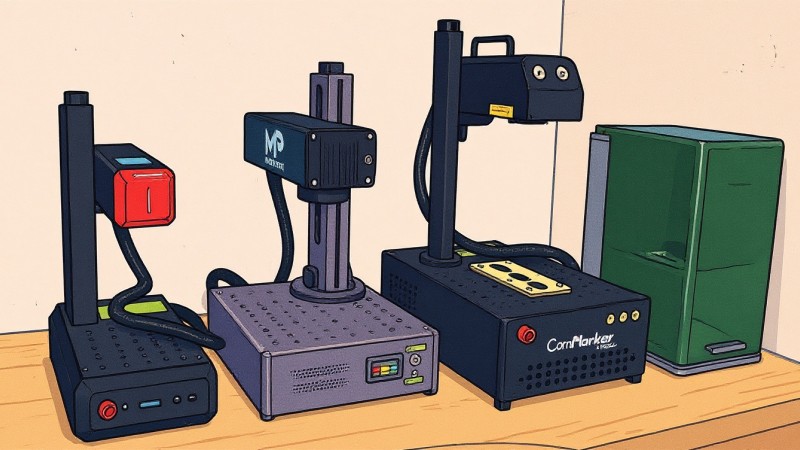
Fiber lasers primarily come in two distinct form factors: the "split design" and the "integrated desktop" (or all-in-one). Split designs typically separate the power source from the galvo head and work area, making them more traditional, often larger, and capable of higher power, suitable for industrial settings. Integrated desktop units combine everything into a single, more compact chassis, popular for smaller workshops and hobbyists due to their space-saving nature.
The workbed itself usually features a grid of threaded holes for positioning jigs, ensuring repeatable engravings. The maximum work area is determined by the F-theta lens installed in the galvo head. These lenses are interchangeable; a 200x200mm lens gives you a larger area but potentially less concentrated power, while a 110x110mm lens offers a smaller area with more focused power. You can swap them out to suit different projects.
Practical tip: Consider your available workspace and portability needs. Integrated desktops are great for tight spaces, while split designs offer flexibility for larger or industrial setups, often with greater power options.
Focusing, Control, and Software Ecosystems
Achieving proper focus is crucial for a crisp mark. Most fiber lasers use a simple yet effective two-red-dot focusing system: you adjust the laser head's height until the two red guide dots converge into one, indicating perfect focus. This height adjustment can be manual (a crank handle) or electronic (a button-controlled lift). While electronic lifts add convenience, manual adjustments are perfectly functional and don't justify a significant price jump alone.
Control panels on fiber lasers are typically minimalist, featuring basic buttons like start, stop, pause, and an emergency kill switch. However, some newer models, like the XTool F1 Ultra, are integrating touchscreens and even advanced autofocus features with internal cameras, making the user experience more akin to a modern desktop laser. For software, LightBurn is a highly recommended, versatile choice, constantly improving its galvo support. EasyCAD is another common option, though its interface can feel dated. Brands like XTool have their proprietary software (Creative Space) that ties into their specific hardware features.
Practical tip: While advanced features are nice, focus on a machine that integrates well with widely supported software like LightBurn, which offers the most flexibility across different laser types and brands.
Making Your Decision: What to Look For
Choosing your ideal fiber laser means balancing budget, desired capabilities, and user experience. Start by defining your primary use: professional, hobby, or small business. Then, decide if a Q-switched (traditional) fiber laser is sufficient for robust metal marking, or if the advanced control of a MOPA is necessary for specific effects like colored engravings on stainless steel or very dark marks on aluminum. Remember, MOPA comes at a premium.
Next, consider power and laser source quality. While higher watts mean faster work, a reliable source (JPT or Raycus) at 20W-50W is often a better investment than a higher-wattage machine with an unproven (often Max) source. Evaluate form factors based on your workspace and portability needs. For desktop fiber lasers, brands like OMTech or ComMarker offer solid entry points with Raycus sources. For MOPA, newer ComMarker B6 models with JPT sources provide excellent features.
Finally, factor in the entire package. While machines like the XTool F1 Ultra might be pricier for their wattage, they offer an unparalleled user experience with integrated cameras, autofocus, and intuitive software, making them fantastic for ease of use. If you're comfortable with more manual operation and want pure performance for the price, exploring split-design units from Cloudray or ComMarker (e.g., Titan 1) for their power-to-cost ratio might be better.
Practical tip: Don't solely chase wattage. Prioritize a reputable laser source, robust build quality, and software compatibility to ensure long-term satisfaction and reliable performance.
Frequently Asked Questions
Q: Can a fiber laser cut metal?
A: While high-power industrial fiber lasers (often 1kW+) can cut metal, the desktop fiber lasers discussed here (20-100W) are designed for marking, engraving, and annealing, not cutting through metal sheets. This buyer's guide focuses on engraving and marking, not cutting.
Q: Is a MOPA fiber laser worth the extra cost?
A: A MOPA fiber laser is worth the extra cost if you specifically need features like colored markings on stainless steel, finer control over pulse width for nuanced material interactions, or very specific annealing effects. For most general metal marking and deep engraving, a traditional Q-switched fiber laser is perfectly capable and more budget-friendly.
Q: What software should I use with my fiber laser?
A: LightBurn is highly recommended due to its comprehensive features, user-friendly interface, and growing support for galvo fiber lasers. EasyCAD is also common, especially with many Chinese machines, but has a steeper learning curve and an older interface. Some brands like XTool use their own proprietary software, which might offer a more integrated experience.
Q: What is the typical lifespan of a fiber laser source?
A: A quality fiber laser source (like those from JPT or Raycus) typically has a very long lifespan, often rated for 50,000 to 100,000 hours of operation. This translates to many years of use, even under heavy daily operation, making fiber lasers a durable and reliable investment.
Conclusion
Choosing the right fiber laser can transform your ability to work with metals, offering unparalleled speed and precision for marking, engraving, and annealing. We've explored the core differences between fiber, CO2, and diode lasers, highlighted the unique advantages of galvo systems, and delved into the specifics of Q-switched versus MOPA technologies. Understanding power, laser source manufacturers, form factors, and software ecosystems are all critical steps in making an informed decision.
Whether you opt for a workhorse Q-switched fiber laser or the advanced versatility of a MOPA, remember to prioritize a reputable laser source and consider the overall user experience that best fits your workflow. With this guide, you're now well-equipped to navigate the market and invest in a fiber laser that will unlock incredible new possibilities for your projects. Happy laser engraving!
