
5W vs 10W UV Lasers – Understanding the Real Performance Gap
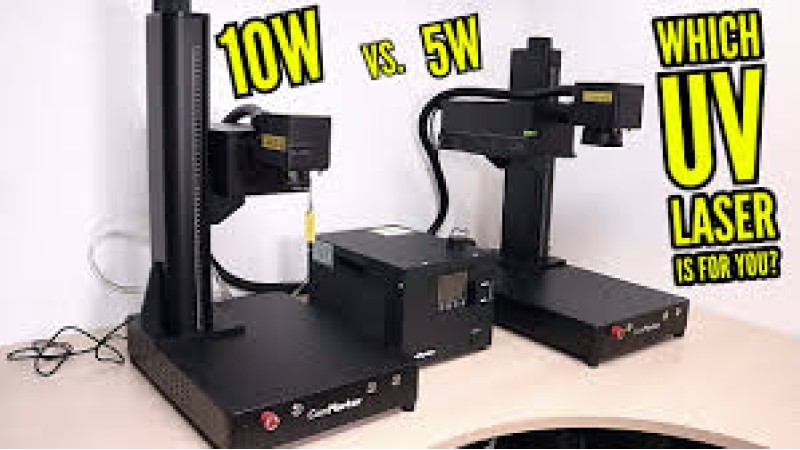
5W vs 10W UV Laser — The Real Performance Difference Explained for Engravers
When comparing UV lasers, many assume higher wattage automatically guarantees better engraving. But in laser technology, precision, pulse frequency, and beam stability often matter more than brute power. The 5 W and 10 W ComMarker Omni 1 may look nearly identical from the outside, yet their behavior changes dramatically depending on the material, the focus depth, and even the engraving style. Understanding how each performs helps you make the right choice for your workshop—whether you focus on fine detail work or heavy-duty production.
Table of Contents
- How UV Lasers Work and What Wattage Really Means
- Engraving and Cutting Wood with UV Lasers
- 3D and Deep Relief Engraving on Organic Materials
- Marking and Etching Metals — Aluminum, Steel, and More
- Stone Engraving Performance Comparison
- Etching PCBs and Electronic Components
- Glass Engraving and Cutting Capabilities
- Color Marking and Annealing Stainless Steel
- Choosing Between the 5 W and 10 W UV Laser
- Final Thoughts and Practical Advice
How UV Lasers Work and What Wattage Really Means
UV lasers emit light around 355 nm—far shorter in wavelength than CO₂ or fiber lasers. This short wavelength allows the beam to interact with materials through a photochemical effect rather than thermal ablation. In simple terms, it “breaks” molecular bonds instead of burning the surface. That’s why UV engraving produces sharp edges, minimal heat distortion, and no charring even on plastics and glass.
The wattage determines how much total optical energy the laser can deliver per second. The 10 W model doubles the available power of the 5 W, meaning it can sustain deeper passes or operate faster on dense materials. But power alone doesn’t define quality: pulse frequency, duty cycle, and lens selection all shape the end result. For delicate work like micro-engraving or electronics, the 5 W’s softer output is often an advantage.
Engraving and Cutting Wood with UV Lasers
UV lasers are not the first choice for wood—that’s usually CO₂—but their precision opens creative possibilities. On lighter woods such as birch or maple, the 5 W delivers extremely fine texture with almost no smoke staining. The result feels etched rather than burned. For branding marks, ornaments, or layered engravings, that clarity is unmatched.
The 10 W excels when the goal is speed or depth. It can cut through thin veneers or plywood edges faster and penetrate deeper in multi-pass operations. However, because UV interacts less thermally, you still won’t achieve CO₂-style slicing. Think of it more as carving micro-reliefs than cutting through planks. Adjusting focus height between passes—0.2 mm each time—helps prevent resin buildup and keeps details crisp.
3D and Deep Relief Engraving on Organic Materials
When engraving complex 3D shapes or layered textures, consistency across depth becomes crucial. The 10 W’s stronger beam handles the extra layers without losing focus uniformity, provided your lens calibration and Z-axis stepping are accurate. The 5 W can achieve the same look, but it takes more passes and slower speeds.
Here’s a simple workflow many engravers use for 3D UV carving:
- Set up LightBurn or EzCad with 0.02–0.04 mm line spacing for smooth texture.
- Enable “Z Step per Pass” with increments of 0.2 mm for controlled depth.
- Use mid-range frequency (35–45 kHz) to balance detail with efficiency.
The 10 W version tolerates higher scanning speeds and thicker material layers, reducing total job time nearly by half while maintaining identical surface smoothness.
Marking and Etching Metals — Aluminum, Steel, and More
On bare aluminum, the 5 W creates faint contrast and shallow marks. It works, but reflection and low absorption limit the result. The 10 W compensates with higher photon density, breaking through the oxide layer and producing more visible, deeper engravings. With anodized aluminum, both units perform exceptionally, since the surface coating absorbs UV energy efficiently. The difference here is mostly speed—10 W finishes roughly twice as fast.
For metals like brass or stainless steel, UV lasers rely on oxidation or micro-etching rather than vaporization. That’s where control is key: excessive power leaves a dull matte patch instead of the glossy black or blue annealed tone you want. Experienced users often keep power below 60% on the 10 W and slow the speed instead. The 5 W, naturally limited in energy, rarely overheats these surfaces, making it safer for color marking projects.
Stone Engraving Performance Comparison
Stone is one of the biggest surprises for UV laser owners. Many expect only fiber systems to handle it, yet both 5 W and 10 W UV lasers can engrave granite, slate, or marble effectively. The 10 W’s additional energy allows micro-fracturing deeper into the surface, giving stronger contrast and texture. The 5 W, meanwhile, creates finer white marks with smoother gradients—excellent for photo engraving or artistic pieces.
Stone’s reflective micro-crystals scatter UV light unpredictably, so multiple passes with slight focus offsets work better than one strong burn. Air assist or light misting removes dust and avoids frosting. In practice, you’ll find the 10 W about 30–40% faster, but the 5 W produces cleaner transitions between light and dark zones.
Etching PCBs and Electronic Components
When it comes to electronics, precision outweighs power. The 5 W UV laser is ideal for ablating thin copper or removing solder masks without damaging the underlying board. It’s slower, yes, but extremely controlled. The 10 W risks overheating and causing microscopic delamination if not tuned properly.
For those fabricating prototype circuits, use a line spacing of 0.01–0.02 mm, low duty cycle, and high frequency around 80 kHz for the cleanest trace isolation. The 10 W can be used effectively if you reduce dwell time and keep multiple short passes instead of one strong one.
Glass Engraving and Cutting Capabilities
UV energy interacts uniquely with glass—it passes through until the internal temperature threshold is reached, where microscopic cracks form inside. The 5 W excels at surface frosting and small logos, while the 10 W can produce genuine subsurface engraving or even cutting. By focusing slightly below the surface, the 10 W induces a stress fracture that can split the glass cleanly when guided along a path.
This method enables artistic 3D glass pieces or precision cuts on thin panels. To avoid thermal shock, always use moderate speed and short bursts, especially near edges. Both versions work well with LightBurn’s grayscale layering, but the 10 W expands creative range dramatically for multi-depth crystal art.
Color Marking and Annealing Stainless Steel
UV lasers can generate beautiful color effects through controlled oxidation. The 5 W version requires slower passes and higher dwell time, which actually favors color variation—reds, purples, and blues develop more easily. The 10 W focuses on efficiency: faster black or deep blue marks with consistent tone, ideal for logos or industrial labeling.
Annealing depends on reaching the exact surface temperature without removing material. Too much power skips straight to ablation. Keep focus tight, reduce speed, and test multiple frequencies around 20–30 kHz to achieve the dark oxide layer without visible engraving depth. Using nitrogen or clean air assist also prevents rainbow oxidation on polished surfaces.
Choosing Between the 5 W and 10 W UV Laser
When to Choose the 5 W
- Best for delicate materials: plastics, PCBs, coated metals, leather, and acrylics.
- Produces finer detail with lower risk of overheating or glare.
- Ideal for small workshops or artisans prioritizing precision over throughput.
When to Choose the 10 W
- Preferred for mixed-material production—wood, metal, stone, and glass.
- Engraves faster and deeper; saves time in multi-pass workflows.
- Better suited for professional use, signage, and product marking where productivity matters.
In essence, the 5 W feels like a scalpel—precise, calm, surgical. The 10 W behaves more like a multi-tool: stronger, faster, but requiring experience to control. For creative makers, the 5 W is a perfect entry point. For business owners running daily engraving batches, the 10 W pays for itself in speed and versatility.
Final Thoughts and Practical Advice
The debate between 5 W and 10 W UV lasers isn’t about which one is “better”—it’s about what kind of work you do. Both share the same beam stability, accuracy, and optical quality. The key differences are penetration speed and thermal tolerance. The 10 W shortens cycle times and handles tough materials like glass and stone more confidently, while the 5 W shines on fine markings, delicate plastics, and electronics.
Remember: UV engraving is more about finesse than firepower. Perfect focus, clean optics, and accurate LightBurn parameters matter far more than wattage alone. Whichever model you choose, mastering pulse control and focus adjustment will define your results.
Visit Laser-Secrets.com for tested LightBurn libraries and laser engraving settings specifically tuned for UV, fiber, MOPA, and CO₂ machines.
